
In a recent announcement, Microsoft reaffirmed its commitment to enhancing Windows quality, highlighting **File Explorer** as a key focus area. The tech giant expressed plans to develop a faster and more reliable File Explorer experience.
Microsoft stated, “Our first round of improvements will focus on a quicker launch experience, reduced flicker, smoother navigation, and more dependable performance for everyday file tasks.” These enhancements are expected to be available to Windows Insiders in April, with additional foundational updates rolling out throughout 2026.

As one of the most utilized components in Windows, File Explorer is pivotal for accessing files, transferring data, and organizing folders. A sluggish File Explorer can significantly degrade overall system performance.
Despite Microsoft’s previous attempts to enhance File Explorer through redevelopments of its UI, various background optimizations, and preloading techniques, users still find File Explorer in Windows 11 slower than its predecessor, Windows 10.
Understanding File Explorer’s Performance Issues
A significant recent attempt to enhance File Explorer involved the introduction of background preloading. Instead of launching upon user interaction, the tool preloads in memory for quicker access.
This preloading technique essentially acts as pre-caching, allowing resources to load ahead of need, facilitating a faster access time. Testing has demonstrated that, with preloading enabled, File Explorer does indeed launch more swiftly. The added RAM consumption is relatively minimal—approximately 35MB—making it feasible for most users.
However, this improvement pertains solely to launch speed and does not address the sluggish behavior experienced post-launch. Navigating files, accessing context menus, and general responsiveness remain areas of frustration for users.
Context Menu Challenges
One of the primary concerns is the context menu, which is intended to be instantaneous but often disappointingly slow. In Windows 11, the menu occasionally unfolds with noticeable delays, making the interaction feel less fluid.

The current overload of menu options—ranging from “Ask Copilot”to various editing applications—has led to an unwieldy and congested UI. The context menu’s vertical footprint is unnecessarily large, often cluttered with options that most users seldom utilize.
Our tests compared this to Windows 11 LTSC, stripped of many additional features, revealing a more compact and faster-loading context menu.

Although Microsoft has implemented a redesigned context menu in recent insider builds, aiming to declutter and improve organization, these changes have not fully resolved latency issues. The enhanced visual structure is welcome, but users still experience loading delays.
Hybrid User Interface Architecture
File Explorer currently operates on a hybrid design architecture, integrating both the traditional Win32 foundation and modern UI frameworks such as XAML and WinUI. This layered approach can result in increased latency due to the complexities involved.
While earlier versions utilized WinUI 2 with XAML Islands, newer builds start transitioning towards WinUI 3. This evolution strives to refine user experience but adds to the overall complexity of the system.
Real-World Reliability Concerns
Moreover, significant issues have been reported in real-world scenarios, particularly with large file transfers crashing mid-operation. A case study by Max Tech on the Samsung Galaxy Book 6 Ultra highlighted this vulnerability, demonstrating that File Explorer’s reliability is in question.

Microsoft acknowledges these challenges, proposing broad systemic enhancements rather than mere fixes to isolated issues.
Proposed Enhancements for 2026
According to Microsoft’s official communication, upcoming improvements include a quicker launch process, reduced visual flicker, enhanced navigation, and improved performance reliability. These adjustments should start reaching Windows Insiders in April.
Attention to details such as animation tuning, flicker reduction upon folder opening, and smoother transitions can significantly elevate the perceived responsiveness of the application. Even minor rendering delays can detract from overall user experience.
Essential Upgrades on the Horizon
Microsoft specifically mentioned the need to expedite search, file operations, and navigation processes:
- Significantly reduced latency for searching, navigation, and accessing context menus.
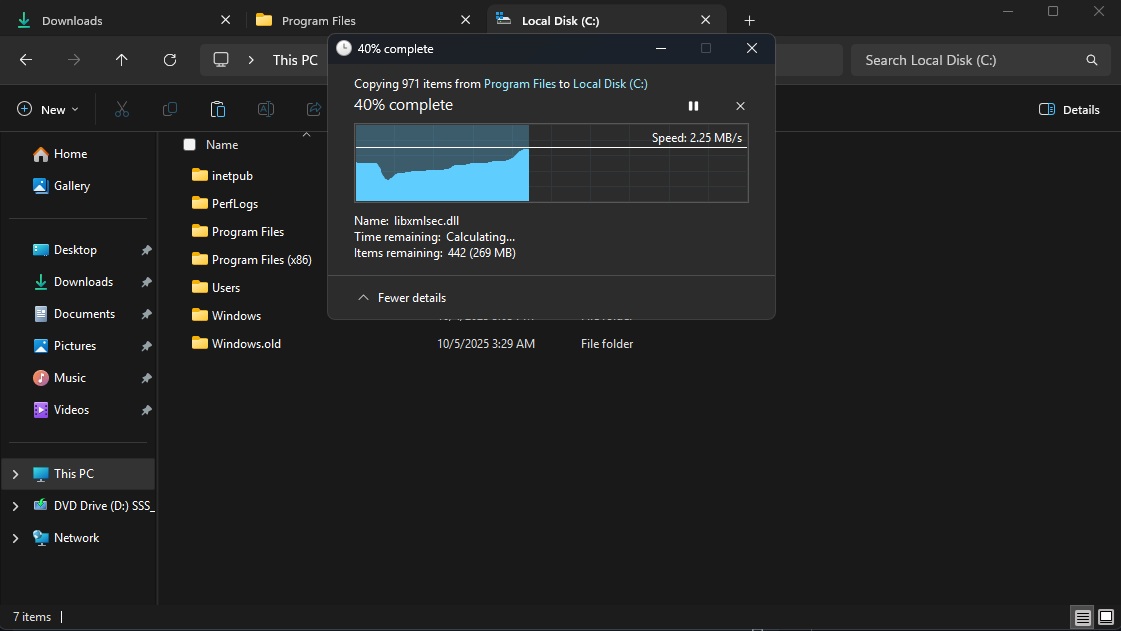
- Enhanced reliability and speed for copying and moving larger files.
- Responsive launch times for common file tasks.
Improving search functionality, especially in extensive directories, could notably enhance user efficiency. Additionally, Microsoft is addressing taskbar search capabilities to further streamline operations.

Navigation enhancements aim to eliminate UI redraw delays, facilitating quicker transitions between directories. Improvements to the right-click context menu, including lower latency and more efficient extension management, could address one of the most prominent issues users face.
File Operations Enhancements
Critical updates also focus on file operations, ensuring that copying and moving files becomes more efficient and reliable. While the addition of a dark mode to file operations aligns with the aesthetic progression of Windows, its functionality remains equally important.
System-Level Updates on the Way in 2026
Moreover, Microsoft is committed to minimizing “interaction latency” and advancing the “shared UI infrastructure” across Windows. These adjustments aim to streamline how components operate, potentially leading to reduced delays system-wide. The shift towards WinUI 3 signals a departure from heavier, web-oriented components for a more efficient architecture.
These improvements are part of a broader initiative to enhance Windows 11 throughout 2026, targeting reduced RAM usage, heightened system responsiveness, and the elimination of inconsistencies within the OS.
Why Third-Party File Managers Are Outpacing Microsoft
Evidence that **File Explorer** has room for growth can be seen in the rise of third-party file managers, like File Pilot. Even in its current Beta stage, File Pilot demonstrates quicker launch times, instant context menu access, and an overall smoother user interface compared to the default File Explorer.

What Makes Third-Party Solutions More Efficient?
Unlike File Explorer, third-party applications are typically built without the burden of legacy code and the constraints of multiple UI frameworks. They also avoid unnecessary integrations, such as cloud features or Copilot actions, which can slow down performance.
However, it’s essential to note that third-party file managers cannot completely substitute for File Explorer, as Windows relies on the native application for essential system functionalities. Thus, while these alternatives showcase the potential for improved performance, the responsibility ultimately lies with Microsoft to optimize its flagship file management tool.