
Microsoft’s Copilot has introduced a new feature that encourages users to take breaks, reminding them of their human nature in contrast to artificial intelligence. This notification suggests a shift in user engagement strategies aimed at promoting healthier interaction with digital interfaces.
Although I utilize advanced services like Gemini Pro and ChatGPT Go, my interactions with these AIs are typically measured and deliberate. In contrast, I approach Copilot more casually, feeling free to explore various queries without hesitation. This laid-back attitude may stem from the apparent unlimited access afforded by Copilot’s free version.
Interestingly, Copilot took the initiative to prompt me to step away from my work. While engaged in several hours of low-level research using Microsoft’s AI tool, I received an unexpected message in the chat interface: “Time for a break? Copilot is an AI, but you’re not. It might feel nice to take a breather.”

The suggestion to take a break was indeed refreshing. Initially, I presumed this notification was a gentle reminder to limit my usage due to potential daily caps. However, upon returning to my tasks after a five-minute pause, I encountered no restrictions, leading me to reflect more deeply on the implications of this feature.
Understanding Copilot’s Usage Tracking
Today’s cloud-based applications, particularly those powered by AI, commonly track user engagement. However, Microsoft’s approach with Copilot stands out for its strategic intent. To elaborate, while using the web version of Copilot, the break notification appeared as a subtle, non-intrusive pop-up at the top of the chat interface, offering a button to dismiss it at will.
Throughout my session, although I engaged with Copilot intermittently, the tab was open for hours. This may have conveyed to Microsoft that I was involved in a high-frequency and sustained interaction, prompting the AI to issue a soft intervention.
Many digital platforms, like YouTube’s “Take a Break” feature or Apple’s Screen Time notifications, employ similar strategies to promote user well-being. It’s natural to presuppose that Copilot functions in this vein, automatically triggering reminders once specific thresholds are reached.
While it remains unclear if this initiative is linked to Microsoft’s recent announcements regarding their AI operations, the absence of widespread reports leaves room for speculation. Regardless, I appreciate Copilot’s proactive stance towards user wellness, particularly in contrast to other AIs, which might temporarily suspend service instead of providing such gentle nudges to rest.
Exciting New Features Coming to Copilot
In addition to its wellness prompts, Microsoft is continuously enhancing Copilot with a range of new features designed to increase user engagement:
- Pinned chats: This feature allows users like myself, who frequently check diet macros or seek dictionary definitions, to pin relevant chats for quick access.

- Improved long-term memory: Copilot is now more adept at retaining context from prior conversations. Users have the ability to request deletions or memory management via settings.

- Study and Learn mode: This mode allows students to generate quizzes, create flashcards, and leverage Microsoft’s Mico voice system to enhance their learning experience.

- macOS advancements: Copilot for Mac is catching up with features available on Windows and web versions, encompassing podcasts, imaginative tasks, library functions, and more.
- Group chat summaries: Now, Copilot can summarize lengthy group discussions, transforming them into editable documents for easy sharing or saving.
- Enhanced text handling: The platform now permits pasting of text exceeding 10, 240 characters, automatically converting longer inputs into file uploads, easing the workload for researchers and professionals.
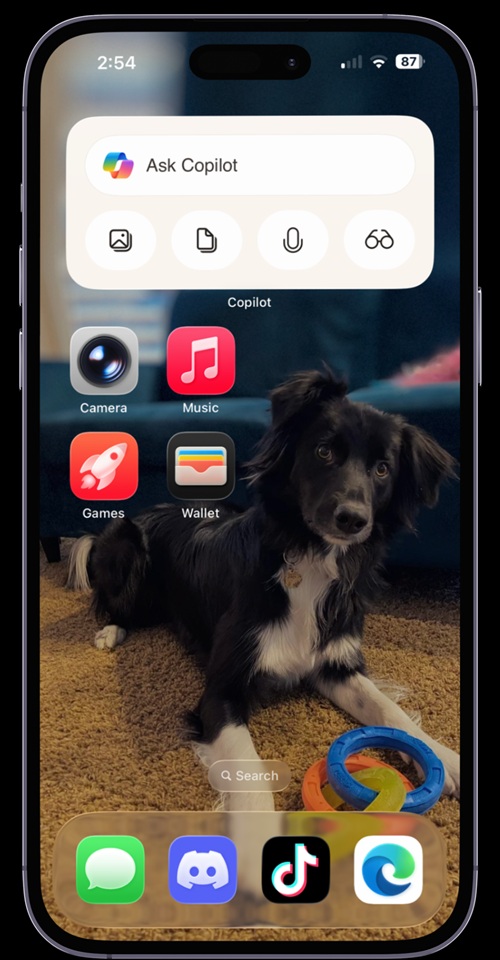
Copilot widget for iOS - New iOS widget: Following the Android release in 2025, the new iOS home screen widget enables quick access to common Copilot functionalities without opening the app.
While Microsoft strives to enrich Copilot’s offerings, there remains a noteworthy sentiment amongst users regarding the company’s AI initiatives. Historically, I have found Cortana to exude a more distinct personality compared to Copilot. Nevertheless, the thoughtful prompt to take a break has piqued my interest in this latest iteration of the AI.
It’s clear that user trust in Windows remains an ongoing challenge, a sentiment echoed among many Windows users over the past few years. However, the Windows President’s commitment to restore confidence in the platform, along with efforts to minimize intrusive AI components, signals a positive direction. Until these improvements are fully realized, users can confidently disable certain AI features on Windows 11 without resorting to potentially unreliable third-party tools.